

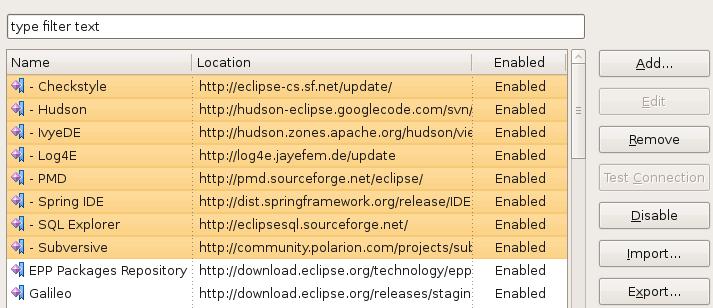
 The Eclipse developers did a really nice upgrade to the Plug-in manager in the new Galileo release. Managing plug-in sites seems much easier and cleaner with the new Available Software Sites menu option in the main preferences area. Not really a new feature, but seemingly more obvious, is the ability to import and export update sites to and from your team mates. I have exported my settings and linked them to the XML file icon on the left. Simply download the XML file and import them into Eclipse and you are ready to go. I can’t believe I never used this feature in the previous versions!
Also, don’t forget that you can also have Eclipse automatically find new updates for you. 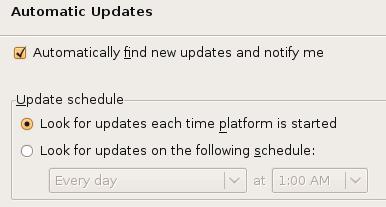 This is not a new feature either, but one that I always seem to forget! I just hit the Check for updates option every so often; not nearly as convenient! You can find this option under the Install/Update preferences panel as well.
Once you have your software sites configured, it is time to install or update your configuration. Under the main Help option, select Install New Software. You can select multiple plug-ins for installation or use the new Work with: option. You can filter your plug-ins based on a specific site’s configuration file. I’m not exactly sure why I like this better, but the old multi-tab Ganymede version was just too busy. I think the new screens are much cleaner and easier to work with.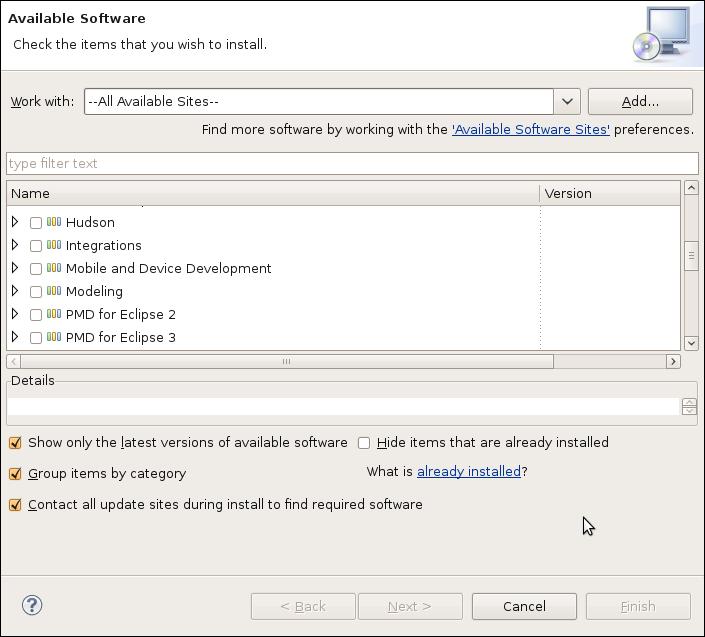


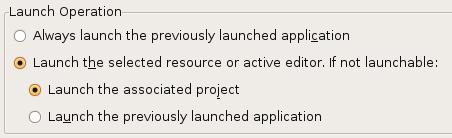
 I have to give credit to a co-worker who overheard me complaining about Eclipse one day… Ever since upgrading to the Ganymede version of Eclipse, the launch buttons for executing and debugging applications and unit tests were tied to the currently active editor. This was so annoying, I could not believe the Eclipse developers changed this behavior. Every time I clicked on the button, Eclipse would ask me what I wanted to do…. No, I don’t want to execute the XML file I was looking! No, I don’t want to execute the random Java file that I just fixed; I want to run the last unit test!
  I’m sure that everyone has seen this little icon on some web page or blog. Probably, like me, you never bothered to really check it out. How many tools or services do we need to save our bookmarks? I never worried about bookmark synchronization in the past. I would just re-Google my search, nine chances out of ten, I would find the page I was looking for. I generally don’t have time at work to read most (any) of the interesting articles I run across. To solve this problem, I started emailing the URLs to my home email and would read them in my spare time. This worked fine, but was kind of painful. I decided to gave
  I created an account,
 I recently found a plug-in that I wanted to share as well, called