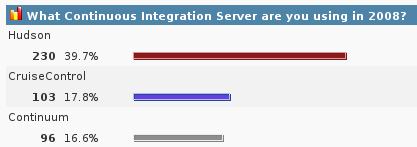
Since I was looking through the Hudson plug-in list this week, I decided to try a few more of them. We currently have Hudson continuously deploying a simple web application to a Tomcat instance. Since both Hudson and Tomcat are running on the same server, it was pretty simple to have Tomcat point to the WAR file generated during the build process. Tomcat notices the new WAR file and automatically redeploys the application. Pretty simple and pretty handy; this is about a 100 times easier and faster than dealing with our standard Weblogic deployment process!
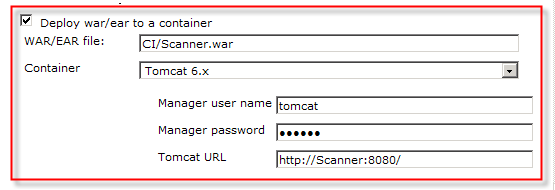
 So, how do you deploy your application if Hudson is running on a different machine than your Tomcat instance? Fortunately, Hudson provides a plug-in to solve this problem, simply named the Deploy Plug-in. It supports a variety of containers, taking advantage of the Cargo Framework. Can’t get much easier than this, just point to your WAR file and fill in the container information. That’s it! I tried it out today and it worked perfectly. This was a much cleaner approach than adding the logic to the build process.
Having the current code set continuously deployed is a great benefit all by itself. This helps ensure that your application is built correctly and is deployable; How many times have you forgot to add that new JAR file to the WAR, only to discover the failure several days later? Continual deployment also makes the application constantly available to the analysis and test teams. This allows everyone to see the current state of development and bounce through the application to see how it will ultimately work. This early exposure also gives developers a change to resolve issues much earlier in the development cycle. We can achieve more value by adding the integration or system testing to the process as well… Just think how much we could reduce our development and testing cycles with this level of testing?
I have been starting to read about Selenium on the Hudson mailing list and found this interesting blog by Ben Rometsch on “Easy Automated Testing with Hudson and Selenium“. I really liked this picture from the article (hopefully it will spark your interest too!) and truly believe this is what we should be working towards… Maybe this can be one of my next educational adventures!!!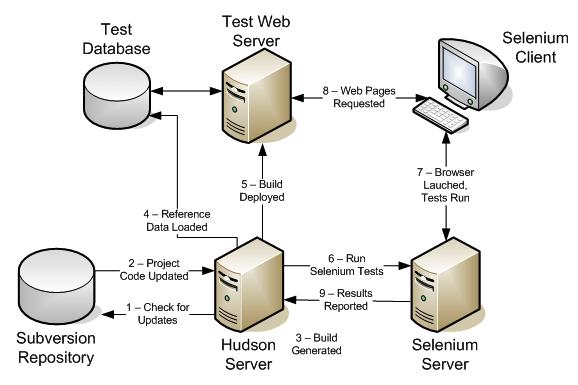


 One of the best things about the
 My problem was, how to tie the Ivy dependency report into my continuous integration process. Building the report was easy, but how could I make it available on the main Hudson project page? Unfortunately, there was no plug-in to make this happen; I was actually thinking about writing my own plug-in this summer, but never quite got around to it (or blogging for that matter!) Fortunately, this appears to have been a common need and someone was nice enough to release a really nice plug-in this past July, called
  There is one area that the Hudson community could be a little more helpful. The Hudson tool is very good about showing you when updates are available for itself or installed plug-ins. However, there appears to be now good process for discovering new plug-ins. I even follow the Hudson mailing lists, and there are no notices about new or updated components; the only way I know about upgrades is to click the “configure” link every so often, when I actually remember! To find out about new plug-ins is even worse, I have to look at the
 I was looking for a development build of the IvyDE plug-in for Eclipse tonight and I stumbled across the
 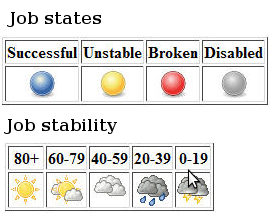 I have been experimenting with Hudson for several weeks now and I like the tool much better than Cruise Control. Not to say it does not have its issues, it generally works very really. I have mostly had issues getting reports to show up in the project. For example, it appears that on a new project, jUnit test results will not show up until after the first completely successfully loop; kind of strange. One issue that is really frustrating me, the
 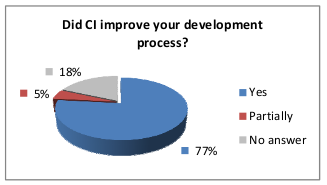 My last rave about Continuous Integration (CI)… I happened to find a really interesting document this week, and I just had to share it… The main point that I wanted to stress is the value of CI. The study was from a very small sample, but the results where in line with my personal views. The document is a very good comparison of twelve different tools and provides a good background on why one would use CI. It is easy to read and contains lots of interesting graphs.