
 I have been doing a lot of writing during the past six months – maybe as a professional, as I was paid to write! I worked on a number proposals for one of the big consulting firms. It was a very educational experience and I definitely learned a lot about the process. I’m obviously not a writer, but really enjoy the process. Writing provides two outlets for me, I get to be somewhat creative and it allows me to share my experiences. Working on proposals was not quite as much fun as blogging, but it did have a creative aspect to it… I think that I had as much fun developing graphics as I did writing! The two biggest challenges for me were time and perspective.
 Time is an obvious problem. The government typically gives you very little time to turn around an RFP and everyone does whatever it takes to get the response completed. It was a very interesting process. It takes so many people to put one together, just image what it takes to put together a 40 to 100 page response document – we are talking serious work. Fortunately, no single person writes the response and the work was distributed by section to teams which provide the content. While this is a reasonable approach to get the work done, it can lead to the second problem, which is perspective. Sometimes you are asked to write a section and are given absolutely no context of how it will be integrated into the document. The better proposal managers will build an outline; this gives the writers a general idea of how their contributions will integrate into the overall document. This approach is a big help for the writers, but does not solve all of the problems.
 Unfortunately, writing is very personal process and the appropriateness to the response is highly subjective. Proposals are fairly well structured. but each proposal manager has developed their own personal rules and approach to generating a good response. As a content provider, you have to develop a thick skin and not be too offended by the reviewer’s comments; it was very typical for your work to get shredded. It was hard to put so much time and effort into a document, just to have someone say it was not exactly what they were looking for. My boss was very good about this; he knew it was much harder to create content, than it was to critique it. I quickly learned to develop my visuals and outline before getting too invested, this helped me communicate where I was heading and minimized my rework. Even with this approach, it did not prevent rewrites. The last proposal I worked on, I rewrote the technical approach section four different times, starting from scratch each time. I’m not sure any of them were actually wrong or bad, but they just did not fit into with how the ultimate proposal was to be assembled. Many times, I would write five or six pages, only to have a single page included in the final response, that was always kind of a drag! It was still fun, each proposal taught me something new, a better way to write or assemble my thoughts, new technologies and how to apply them to large scale government problems; what more could you ask for! (Actually, better time management would have been nice!)
One day my boss and I were talking, actually he was red-lining one of my documents and talking about the proper usage of which and that. He was studying for his GMAT and there was a review of common grammar rules. Having been out of school for quite a few years and only taking the bare minimum writing and literature courses, I honestly do not remember even learning this rule! I thought it was kind of interesting. Since I write to improve my writing ability, I thought it deserved a blog entry. Funny thing, this subject popped up in one of my RSS feeds today and included the exact rule that my boss and I talked about!
I did a quick Google on grammar mistakes…. the web is full of funny examples! Let me be the first to say that I’m no expert and this blog is probably full of mistakes, hopefully not too many! There are literally thousands of references on the web. The first link was the post that I found today that prompted me to write this. The second link was just kind of funny; I liked the graphics. The third link just made me laugh. The fourth one is serious business! I know that some of these points seem trivial, but how we write and speak says volumes about us as a person and some people actually pay attention to these small details! I hope you will take a few minutes to refresh your memory on some of these rules They are really quick reads and might actually be helpful someday!
- Improve Your Writing by Avoiding These Twenty Common Grammar Mistakes Almost Everyone Makes
- How to use a semicolon
- Flagrant Grammar Mistakes That Make You Look Stupid
- GMAT Verbal: Five Must Know Grammar Rules
Another blog post sitting in my drafts for the last 7 years. I wrote it, I thought I should publish it!




 During my time off, I decided to start listening to some technical podcasts. I assume this makes me a complete geek, but since I increased my running distance to three miles per day, it turned out to be a very good use of my time. I believe podcasts can be an excellent source of information and even entertainment. The best strategy is to listen to different topics, topics that you don’t encounter everyday. A person can only read so many blogs! If you are like me, you probably only read blogs which are related to your personal interests. Seems completely normal, but how do you ever get exposed to different technologies or techniques? Unless you change companies or completely refresh your team every 6 to 12 months, your learning environment can become very stale. Listening to different topics is an great way to re-energize your brain and kick start your creative thought processing; at least it does for me!







 A simple, but extremely cool feature is the “New Tab” behavior. It obviously opens a new tab, but its contents are quite different than you would expect. It is basically divided into three sections, Apps, Most visited, and Recently closed. Under the Apps section, you will see the Web Store icon; does everyone need to have their own app store these days? Anyway, the Web Store is a very well done site, that makes searching and installing new behavior extremely easy, using either applications or extensions.
 My favorite feature of Chrome has to be the Extensions. Extensions add additional behavior to the browser itself. You can see from the picture to the right, I have added quite a few of them! They integrate into the Navigation Bar and look very nice, consuming minimal space while providing significant functionality. They look similar to the icons found in cell phones; many of the extensions have little indicators that track the number of items you need to address. You can find extensions for all of the standard Google tools: Gmail, Reader, Calendar, and even eBay. The Calendar extension is extremely helpful; it will tell you how long until your next appointment and when you mouse over it, it shows you the event details. The WP Stats is another personal favorite; it tells me how many people have looked at my site! Clicking on some icons will navigate you into the corresponding website, much like a short cut. Other icons have specific behavior, such as showing you detailed web site access statistics or an enhanced view of your search history. My favorite blogging tool, ScribeFire is also available in Chrome, but the spell checker is not working! I like the placement and interaction of the Chrome extensions much better than the traditional Firefox “Add-on” view, which is typically at the bottom of the browser window; Chrome make the extensions feel more integrated with the browser and part of the actual user experience.
 Everyone keeps asking me why, what happened to your blog? Why did you stop posting? Unfortunately, it is very complicated answer… I really don’t want to go into the the details. Chances are, you have been in the same boat as me; placed on high profile, transformational project which needed to be done by a specific, non-movable date. It was a rather large project when you consider how it was staffed; project managers, agile coaches, testing teams, analysis team, business liaisons, business consultants, architects, and a few developers. Combine this sizable staff with a new business vision, introduce some new technology requirements (ESB, BPM, Rules), and I think you will get a pretty clear picture of why I stopped blogging! This was a very unique opportunity to finally “do it right”; we were able to complete the system last November/December and successfully migrate to production. It was a very stressful period of time for everyone on the team, spanning many months; this including canceled vacations, working weekends, and extremely long days. This is not really a rant, as we all have to go through these experiences at different times in our career, this is really more about what you can learn and can take away from the experience. Fortunately, I was able to be a student of the process and observed and learned many valuable lessons, and even the reinforcement of many of my fundamental beliefs. Unfortunately, I just did not have the energy to share those thoughts and gave myself a break from blogging. There are several topics that I do hope to go back and revisit, so you will have to keep on reading!!!!
 What’s next?
 I found this really cool poster when we were Christmas shopping last December and thought it would be great for my guitar playing son. Needless to say, I hid the poster in the basement and found it in January, oh well!
 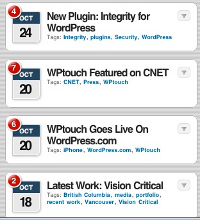 I ran across a website on my phone the other day and was very impressed with the presentation. I had tried some “mobile friendly” WordPress themes in the past, but was never very excited by them; they always looked too bland on high-resolution devices. A quick Google search turned up the popular
 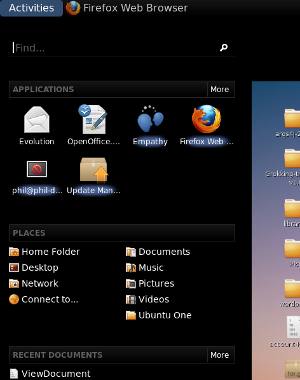 Half of the fun of playing with Linux is trying out new stuff! I found a blog the other night that talked about
  After using it for a couple days, I have learned there are multiple ways to navigate around, minimizing the clicks. The “Find” is one such short cut, you can quickly find an application in the menu system. It still has the good old fashioned alt-tab behavior to quickly switch between applications. The only option that was not obvious to me, was the virtual desktops. I’m not a big virtual desktop user any more (too much time on a Windows box during the day!); it did seam a little easier with the 2.x desktop (just needed to scroll the mouse w
 heel, I think).. Now you can dynamically (and easily) add new desktops through the activities menu (just click the plus icon). There is probably a nice short to to navigate between desktops, but I did not look for it. One other usability note that is not completely obvious; you don’t actually have to click on the word “Activity” to get access to the menu, just push the mouse all the way to the corner and the menu pops up… Nice…
 A couple of other interesting things I found on the
  I have been so busy with work and life, that my blogging had basically stopped for the summer. I keep sending myself topics and notes about things that I would like to write about. Unfortunately, I have not had a chance to do anything with them and the topics keep piling up! I was talking with one of my coworkers last month, and he mentioned that he also had a blog. I mailed myself the link to his site,