
To be honest, this was not a topic I was actually planning to write about. However, because I received a couple of interesting comments on a recent blog entry, Unfriendly Developer Practices, I thought I should clarify my position.
| Question of the Day |
| Should your IDE (Eclipse) configuration files be checked in as part of your project? |
One of the comments suggested that there should be should be no dependency between the build system and the IDE. Another person suggested the disconnect between the IDE and the build system creates a convenient place for dependency inconsistencies to develop unchecked.
I completely agree with both of those statements and have seen both problems manifested several times. However, there are two simple tools can make this a non-issue: Continuous Integration and Dependency Management.
- Continuous Integration is obvious; if that lazy developer forgets to check in a dependency or update the build scripts, the build fails. Not perfect, but the problem is immediately detected and the relevant people are notified of the situation. The problem can be resolved within minutes.
- The Silver Bullet for me, was the addition of the Ivy Dependency Management tool into our build process. Because the build system and IDE share the same dependency configuration, the project’s dependencies were now managed in single place. Using the IvyDE plug-in, Eclipse simply worked, with no additional configuration. Using the externalized dependencies and basic Ant targets, the project could create a robust, change resilient build system. To achieve this level of robustness, I took advantage of the Ivy post resolve tasks. It was not until I discovered how easily they could isolate the build scripts from the actual dependencies, did it all come together. The real beauty of this approach is that no files (dependencies) are directly referenced. The post resolve tasks create variables which contain all of the appropriate files; the build script can then treat these variables generically, without concern. Nice and clean!
It was an unstated, fundamental requirement to have no “direct” dependency on Eclipse; such that we could all revert back to the wonderful world of Emacs tomorrow, should the need arise. I don’t think which IDE a project chooses to use, is really that important. I am apparently an Eclipse snob; but all I really care about is having Emacs key-bindings! If a majority of the team works on the same platform, I do believe there is real value around this continuity; that just happens to be Eclipse for me!
I have several other reasons for checking in configuration files:
- It quickly highlights wrong doing! If a developer checks in something specific to their environment, they will break everyone on the team. My goal is for complete project neutrality: check out on any machine, in any directory, and the project is guaranteed to build and deploy. Additionally, check the project out in Eclipse and it should build with no issues, within minutes.
- Not all developer’s actually care about tools. Some developers simply want their environment setup for them. They have no desire to figure out how Eclipse formats code when you save a file or how to configure and run quality checks after each build; implementing business solutions is their primary concern.
- Enhanced team productivity. If everyone’s world (environment) is the same, it is so much easier to spin up a new developer or help a teammate with a problem. Would you really want each developer to go through the discovery process of setting up the project? In the big picture, isn’t this really just wasted time?
- Helping to ensuring quality coding practices and standards. We also check in the Checkstyle, PMD, and Findbugs configuration and rule sets. Taking advantage of the sharable configuration files, both the Eclipse plug-ins and Ant tasks work from the same rule sets, ensuring complete consistency across the team, no matter where the rules are executed.
I appreciate all of the recent comments; thanks for taking the time to reply. They enable me think about and reconsider the decisions I have made, giving me yet another opportunity to learn from my mistakes! As far as Eclipse configuration files are concerned, I strongly believe there is far more project value gained by including them, as compared to requiring each developer manage their own environment. One final note, I have no issue with developers wanting to manage their own world, more power to them! I would hope that these efforts would be to make the overall, shared environment a little better; after all, everyone should be contributing to all aspects of the project! The real point is that everyone should not be required to configure a project, unless they really want or need to.


 Unfortunately, it seems that in our current economic environment, it is more important to prevent mistakes rather than take action to address the underlying problems. This strategy can even be taken to the extreme, putting so many gates into the process, that it actually makes it impossible to move forward. It becomes difficult to fix existing issues and nearly impossible to development new functionality. The number of signatures and the amount of evidence required to prevent errors has become more of an accountability tool, rather than a quality tool.
 Without first running a setup task in
 I started reading about
  My wife gave me a Motorola Droid last December for my birthday. I have been refraining from blogging about it, as there are about a million other phone blogs out there… However, there have been so many good applications released in the last few weeks, that I thought I would share my “Best Apps List”. I think the Android platform has made some significant progress in the last few months. It finally seems like the phone platform does not really matter any more, Android or IPhone OS. All of the “must have” applications are available on the relevant platforms. This is great for consumers, as we are not forced into a platform for specific applications, but rather the experience or philosophy. With the recent releases of Dropbox, SlingPlayer and Kindle applications, combined with all of the other major applications, WordPress, Facebook, Twiiter, Ebay, Flixter, NFL, DirecTV, etc… Now, you have the option to burn hours of your life away on the phone, rather than sitting at your computer!
 I have a love/hate relationship with the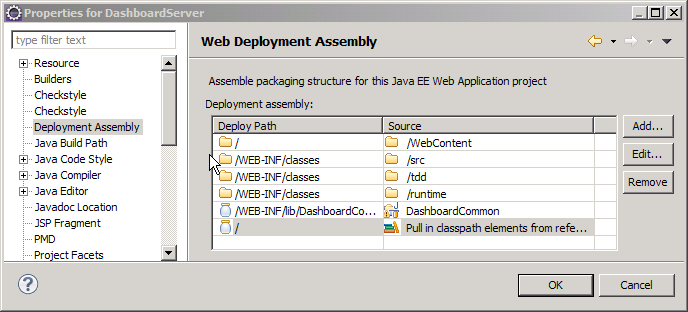
 This problem may have been answered in Eclipse 3.6 (Helios). I tested some of the 3.6 milestone releases, but was fooled into thinking that the IvyDE and WTP integration was broken; the J2EE module dependency option was no longer visible on the project properties. I was too busy to investigate (or look at other menu options!), I just assumed that it was just broken. To make a long story short, there is a new menu option called Deployment Assembly. The new option is a much simpler concept to comprehend; it is more flexible and actually seems to work consistently with Ivy. The most obvious change is the presentation; it gives a better picture of how the web application will be assembled. The old J2EE Module Dependency manager allowed you to choose components, but might have been more tailored for building an EAR file, rather than a WAR. Another issues is the inability to exclude any of the “source” folders. If you manage your unit test classes in a separate source folder, they would also be included in the application (WAR). Not necessarily a problem, but not very clean and could possibly hide unintended dependencies between the two source trees.
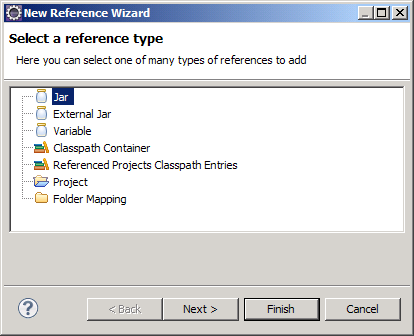
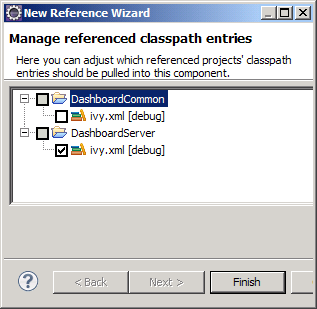 When using IvyDE, the first step is to add an Ivy classpath container. This will add Ivy dependencies to the classpath of your Eclipse project. If you have a WTP project, you will also need these dependencies copied to the WEB-INF/lib directory. This is easily accomplished by clicking the Add button under Deployment Assembly (under project properties). You can add other projects and external jars as well. Here is where it gets interesting, there appears to be two different options. If you have already added the Ivy classpath container to your build path, click the “Referenced Classpath Entries” option and select the ivy.xml file from your project. There might be a little display problem, as the “Deploy Path” for the classpath container does not appear correct, but it does put the libraries in the correct directory location.