
I recently found an interesting web site called Making Good Software. I really liked this guy’s site, he might just save me from writing down a lot of my own thoughts! Unlike my typical post, his are very short and easy to read. I highly recommend checking it out and popping through his other recent posts too. Nothing revolutionary, but just great reminders of how we should be thinking as we write new software. The following blog entries caught my attention:
- 10 Commandments for Creating Good Code
- 5 Tips to Improve Code Readability
- How to Become a Good Software Developer
- Comments are Evil
- TDD is not about Testing
The Comments are Evil statement really hit home with me… I have always said that code should basically be self-documenting. This statement is usually frowned upon some developers and managers; some people might think I’m just lazy. Farthest thing from the truth! By enforcing good coding practices with automation like Checkstyle, PMD, and FindBugs, combined with placing a high value on class and variable names, placing logic in the proper place, and keeping methods and classes small, most comments are redundant and typically provide little value. It was very interesting how the author associated comments with the DRY (Don’t Repeat Yourself) principal. Interesting thought, when your comments simply repeat what the code is already saying!
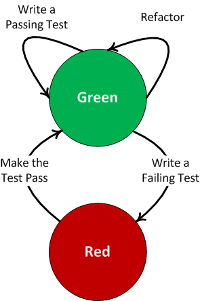 I also place a huge value on refactoring. I borrowed the image at the right to further highlight the point. There are many articles on the “Red Green Refactor” approach worth reading, helping to tie this all together. I guess one of my personal goals is always to create that elegant (simple and clean) solutions, which never happens the first time! Looping through R-G-R a few time helps achieve that elegance, and you end up with code that requires less comments.
Some of the comments in the Making Good Software blog are very interesting has well; many people throwing in their two cents, both pro and con on the value of comments. The author also states that comments cannot be completely eliminated. The code we write is never perfect and probably needs a little extra context to explain the hopefully infrequent imperfections. I think the bottom line is to focus on quality code; eliminate the obvious, limited value comments, and comment the pieces that are truly intricate. If you are writing a lot of comments, then you better go back and look at your design, as something is probably not quite right.


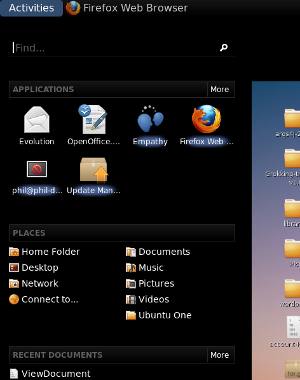 Half of the fun of playing with Linux is trying out new stuff! I found a blog the other night that talked about
  After using it for a couple days, I have learned there are multiple ways to navigate around, minimizing the clicks. The “Find” is one such short cut, you can quickly find an application in the menu system. It still has the good old fashioned alt-tab behavior to quickly switch between applications. The only option that was not obvious to me, was the virtual desktops. I’m not a big virtual desktop user any more (too much time on a Windows box during the day!); it did seam a little easier with the 2.x desktop (just needed to scroll the mouse w
 heel, I think).. Now you can dynamically (and easily) add new desktops through the activities menu (just click the plus icon). There is probably a nice short to to navigate between desktops, but I did not look for it. One other usability note that is not completely obvious; you don’t actually have to click on the word “Activity” to get access to the menu, just push the mouse all the way to the corner and the menu pops up… Nice…
 A couple of other interesting things I found on the
 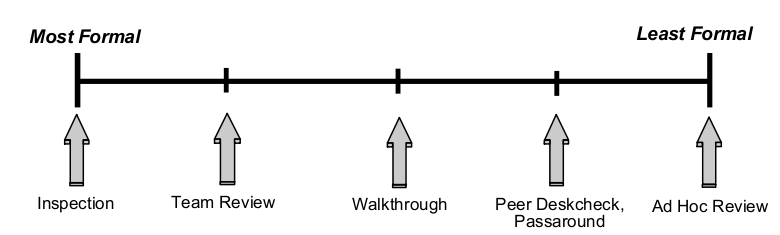 This first one really drives me crazy, but unfortunately, this appears to be the way that most teams perform their “code reviews”. First, the presenter/reader sets up a phone line for all of the participants to dial into, even if they all sit together in the same area! Next, the presenter sets up a “net meeting” and walks the team through the code; adding comments or making small fixes along the way. Maybe I have too limited of an attention span, but I don’t really commit to this type of code review, nor do many others from my observations. Inevitably, someone comes by with a question, or you get an interesting email or instant message; something to draw you away from what is being presented. To make matters worse, you have probably never even seen the code before and maybe don’t even understand the design. How much can you really contribute, other than noticing the most obvious issues? The above graph shows the range of code reviews, from a formality perspective. Not that the process has to be this rigid, but I think it is important to discuss the stages and roles of an inspection:
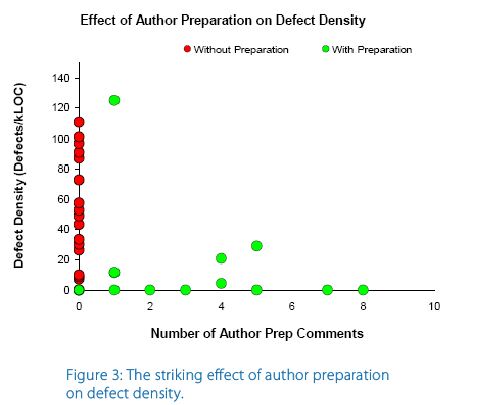 My second point is about preparation. I generally don’t think that most developers are very effective at “thinking on their feet”. It is really not about intelligence, but more about communication. Teams are typically very diverse, both technically and it the way they consume (process) information. It can be very difficult to present code at a level which will be effective for everyone to understand and process. In my opinion, no preparation is equivalent to

 I am kind of tied to Eclipse as my IDE, but do play with NetBeans every so often. I think I could switch to NetBeans, my only real requirement is that the IDE must have Emacs key bindings; some habits are just too hard to break! NetBeans looks like an pretty good tool and seems to be very responsive on my Ubuntu box; I especially like the way it manages plug-ins. One interesting thing that NetBeans does (maybe a little better than Eclipse), is manage unit testing. NetBeans will automatically create the secondary source tree, but seems to default to in-package testing. It is very easy to add the additional test package into the package structure to enable API testing. I also like the way that NetBeans separates the Test Libraries from the regular Libraries. I’m not sure how well this would work when you use a tool like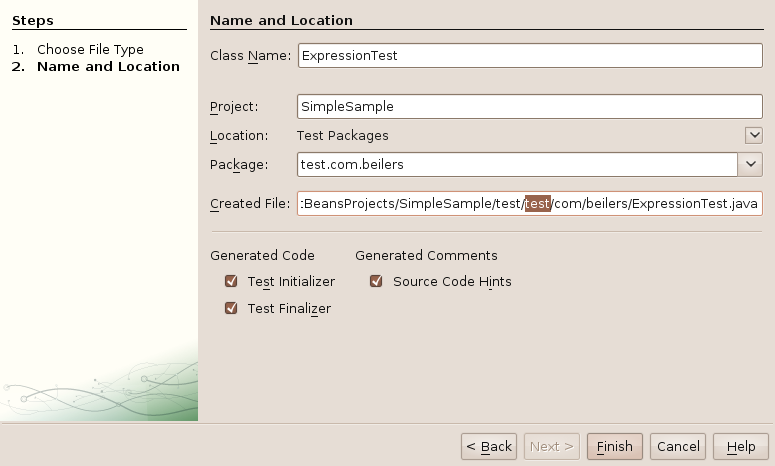

 This was making me crazy the other night… I did not spend too much time on it, thinking is was just me. But, after upgrading my laptop and encountering the exact same problem, I knew there was more too it. It seemed like only the cancel buttons actually worked; all of the next and finish buttons did absolutely nothing, other then beep! I soon realized that I could use the tab key and press enter to move to the next screen; but that did not make me very happy.
 It also