| I actually wrote this post last March, but never got a chance to publish it. That pretty much sums up my year!!! I don’t think I was ever really happy with the way it flowed or the exact point I wanted to make. However, after working with some different teams this past year, I’m even more convinced that code reviews and standards should exist and be enforced. Good topic for another post! |
 I might have said this in a previous post, but I believe that many developers use Agile as an excuse to avoid following institutionalized processes. They prefer to make up their own extremely lightweight methodology, doing only the activities they enjoy or believe they have time for. By adopting an Agile process, many claim they can eliminate the need for analysis, design, and even code reviews! Personally, I don’t believe this was the intention of the Agile methodology. However, given the substantial number of quality gates and sign-offs that organizations institute to ensure the elimination of mistakes, it is no wonder that Agile becomes the easiest method to subvert corporate mandates and deliver software. I completely understand the theory and goal of these mandates, but it does seem that by the time they are institutionalized, the overhead of the process is more complicated than the actual business to be solved! And before anyone corrects my association of Agile and Pair-programming, I do realize that Pair-programming is a tenant of Extreme Programming, not Agile. Unfortunately, many people seem to commingle the Extreme Programming principles with Agile; XP tends to generate negative connotations in some groups, while Agile is complete accepted.

- Code reviews are done as an SDLC requirement; not because the development team actually desires to conduct them or finds value in them.
- The vast majority of code reviews are completely ineffective; there is no preparation, no structured process, and no follow through on findings.
 There is actually a lot of Internet discussion on this subject; I have included a few links at the bottom of this post which I found interesting. None of them changed my personal views, in that code reviews cannot (should not) be eliminated from the process. One point that I would concede, is that pair-programming could make the code review process easier, assuming that fewer issues will be discovered during the review.
I believe that code reviews should be a “continuous process” during the entire development cycle; whereas most people consider the code review to be a process point. Some believe that the review is something that happens at the end of development, after the code is completed, after it has been tested; typically when it too late in the process to make corrections. I feel that code reviews are a never ending cycle of four basic activities, all contributing to the overall quality of the code base.
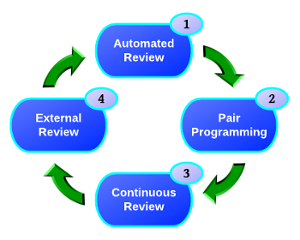
- The easiest and cheapest process is through automation. There are two basic solutions, the IDE and a Continuous Integration Server. Your IDE can be one of the most effective tools. Eclipse can be configured to share coding standards and validations across the development team, eliminating numerous bad practices at their point origin. Tools such as Checkstyle, PMD, and FindBugs can easily be incorporated into your IDE. These same validations (rules) can also be utilized by your Continuous Integration server, providing the final conformance checks. Automation eliminates almost all of the soft issues from the review process and even promotes better coding practices.
- Pair-programming is a very valuable technique and I enjoy the collaboration and education that happens during the process. However, I’m not sure that pair-programming works on all teams, there needs to be a real sense of openness and cooperation for the pairing to be effective. And there lies the real issue, if the pair is very cohesive in their approach, you have the problem of “group think”. If everyone is thinking the same way, it will be much harder to discover issues outside of their common perspective. I believe that code reviews can be more effective when conducted by people who are not wed to the design and/or implementation; an external perspective is always valuable to the process. Another small problem is related to traceability, without the review, there are no review artifacts or documentation to support the process. Next you have the practicality of the schedule. Assuming that you can eliminate the code review process by requiring pair-programming, how do you mandate or assure that it happens? Was all of the code written together by the pair? I find it really hard to believe that 100% of the code will be written completely by the pair. Given all of the demands placed on people, with meetings, vacations, kids, etc; it would not leave many shared hours for pair to write code. It does not seem practical to mandate that no code will be written outside of the paring. So do you only review the code that was not written by the pair? Sounds complicated! All that we accomplished was removing a “learning opportunity” from everyone on the team, including the developer that wrote the code!
- I’m not sure that “Continuous Review” is an officially documented concept, but it is a technique that I have used successfully over the years. Continuous Review is fairly simple, but is potentially time-consuming and highly prone to apathy. The process is extremely trivial; before accepting changes from your teammates, simply review the change set in your IDE. It can be quickly accomplished using the Team View found within Eclipse. You can walk through each commit and its associated files before updating your work area. By spending this small amount of time throughout the development process (each day), you can help ensure that everyone is on the same page; even ensuring that the code is in sync with the design. You get a very good sense of the overall heath and progress of the project, just by watching the commit stream. Unfortunately, not many developers seem to adopt this role, as it takes a serious commitment and can also cause tension, when the team is not as cohesive as it should be (some developers might feel like they are being monitored).
- The final and most common piece of the review process is the traditional “code review”. It has been my experience that this type of review is generally the most ineffective. Even with years of published guidelines, which could actually make the process effective, they are typically tossed out due to the lack of time and management guidance. I have blogged on this subject in the past. These reviews turn out to be more of a code presentation rather than a review. This will unfortunately be the first time that many of the participants will have actually seen the code! No time is allocated for participant preparation. Worse yet, no time is ever allocated for the correction of discovered issues. The reviews are always performed late in the development cycle or during the testing cycle, simply to satisfy an SDLC deliverable. I believe many developers have been conditioned into disrespecting code reviews, simply because they become just another meeting, which produces very little value.
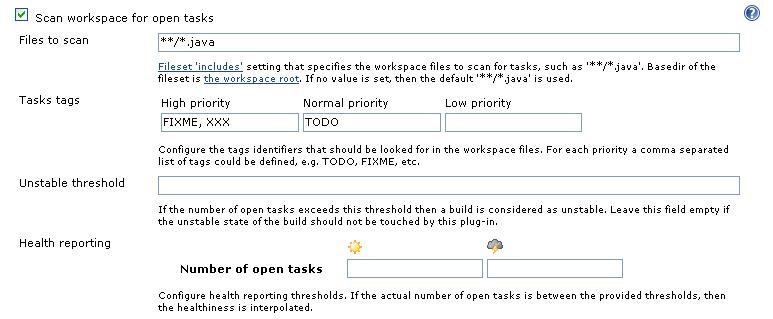
 I might sound like I’m against code reviews, far from it. I am against the traditional code process that focuses on developer selected code, typically presented during a meeting. I recently reviewed the Crucible tool from Atlassian. The tool is far from perfect, but is ideal for managing asynchronous, distributed code reviews. Automated tools provide a variety of methods for selecting the code to be included in the review process, such as querying by user id or change ticket number. The selected changes are then assigned to a collection of developers and the process begins. Each developer is notified via email that they have been assigned a collection of code to review. When convenient for the reviewer, they log into the tool and are presented the files to review. Crucible actually tracks your progress through each file, giving progress feedback to the review coordinator, indicating that progress is underway. The developer is presented the change sets and can add comments directly into the code. Each comment can be categorized as an issue or suggestion. I think Crucible is an great tool, but provides absolutely no reporting capabilities. I have talked with Atlassian and they seem to have absolutely no interest in generating meaningful reports. Even the simplest report, which would show all of the issues found during the review is not possible to produce. I’m a huge Atlassian fan, but this lack of functionality completely boggles my brain. In today’s evidence driven SDLC world, the documentation from the code review is actually more important the code review itself!
Obviously, I don’t think code reviews should ever be eliminated from the process. I also believe it is possible to achieve real value from them, with very little overhead. Hopefully someday, I will actually be able to prove it!








 I’m not exactly sure how


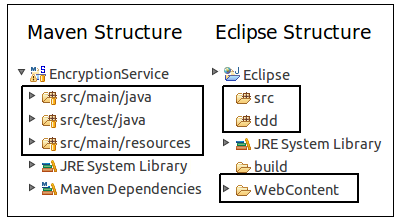 I never liked the required Maven directory structure; I must have subconsciously adopted the Eclipse project structure as my personal standard. Converting the project’s directory structure was trivial and soon realized it was not that big deal after all; I aways separate my source and test files anyway. The main difference is everything lives under the source root, including the WebContent directory. I’m not sure what the “preferred” process is for loading a Maven project into Eclipse, probably using the Maven
 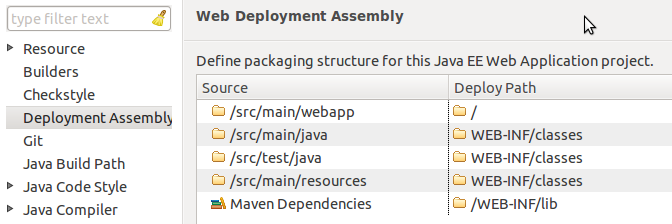 With the addition of the Eclipse “Deployment Assembly” options dialog, it is extremely easy manually configure your project. You need to have a Faceted Dynamic Web Module for the “Deployment Assembly” option to be visible, but that should be a fairly simple property change as well. At this point, you should have a fully functional, locally deployable web application.
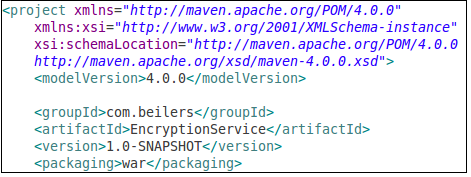 Now we can ignore Eclipse, and focus on building our WAR file using Maven. Even with the minimalist POM shown to the left (plus your dependencies section), it is possible to compile the code and create a basic WAR file. Use mvn compile to ensure that your code compiles. Using the Maven package goal, the source code is compiled, the unit tests are compiled and executed, and the WAR file is built. All of this functionality, without writing one line of XML!
 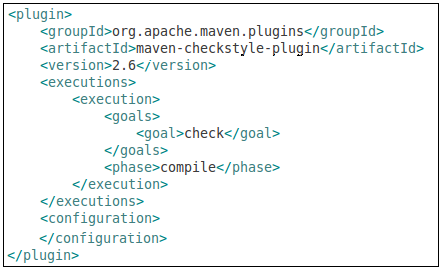 One of the more time consuming parts of an Ant-based build is integrating all of the “extras” typically associated with a project, making them available to the continuous integration server. The extras include: unit test execution, code coverage metrics, and quality verification tools such as Checkstyle, PMD, and FindBugs. This tools are all typically easy to setup, but every project implements them slightly different and never put the results into a standard place! The general process for adding new behavior (tools) to a build appears to be the same for most tools. You simply add the plug-in to the POM and configure it to fire the appropriate goals at the appropriate time in the Maven lifecycle. Ant does not have this lifecycle concept, but it seems like a very elegant way to add behavior into the build. From the following example, I added the Checkstyle tool to the POM. The <executions> section controls what and when the plug-in will be executed. In this example, the check goal will be executed during the compile phase of the build process. Simply executing the compile goal, will cause Checkstyle to be invoked as well. This seems like a very clean integration technique, one that does not cause refactoring ripples.
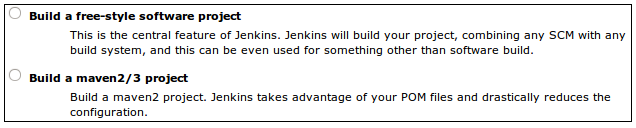 Most development teams also want their project monitored by a Continuous Integration (CI) process. Modern CI tools such as Hudson/Jenkins provide excellent dashboards for reporting a variety of quality metrics. As I previously stated, it is rather time consuming to develop and test the Ant XML required to generate and publish these metrics; combine that with configuring each CI server job to capture these metrics and you have added a fair amount of overhead.
 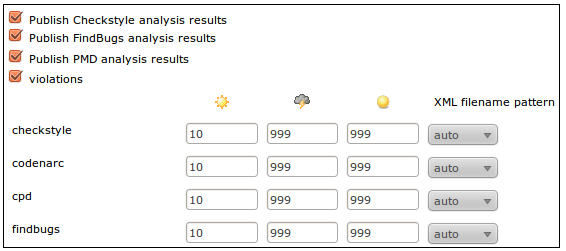 I knew there was support for Maven-based projects within Hudson/Jenkins, but never took the time to understand why it would be beneficial. The main benefit is right there in the description, had I bothered to read it! Configuring a Maven-based job is little more than clicking a few check boxes. No need configure them in Jenkins, using the information provided by Maven, it is basically automatic. This is one interesting aspect of the Hudson-Jenkins fork. Sonatype, the creator of the Nexus Maven Repository manager and the Eclipse Maven plug-in, have chosen the Hudson side of the battle. I wonder what this means for Maven support on the Jenkins side. Obviously, it will not go away, but that might end up being a Hudson advantage in the long run. I still believe that the Jenkins community will quickly out pace the Hudson community.
 If you have ever looked at my blog, you know that I’m a huge advocate of Continuous Integration and have been pushing Hudson for several years now. The end of SUN unfortunately had a significant impact on many open-source projects, including Hudson. Support for Hudson continued to work pretty smooth from a user perspective until last December. I don’t think the quality of Hudson changed, but the quality of the releases seemed to change. The Hudson team had been extremely consistent with their weekly releases; the release notes were always updated, the download links always worked, life was good. As 2010 came to an end, something seemed to change; links pointed to the wrong versions, releases seems inconsistent, release notes were out of date or lagged days after. The most obvious indicator was that the community was very quiet… something was happening behind the scenes.
 Without first running a setup task in

 I was reading the
 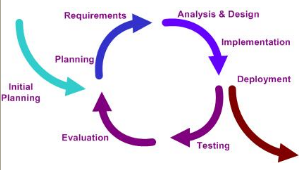 I actually found two versions of the document by the author, Steve Pieczko. The
 I assume that everyone performs some kind of unit testing… The real question is what does unit testing mean to you? For me, it is some form of repeatable, assertion-based approach that can be re-executed by other developers and a continuous integration process. Unit testing is just one piece in my software confidence puzzle. That sounds like a great topic for my next blog! Unfortunately, some developers think that generating some log messages to inspect or stepping through the code with a debugger accomplishes the very same thing. Depending on the competency of the developer, I believe this can be partially true; however what about the next developer who needs to change the code?
 Ok, that is just about enough Hudson for this month, unless I get fired up about